
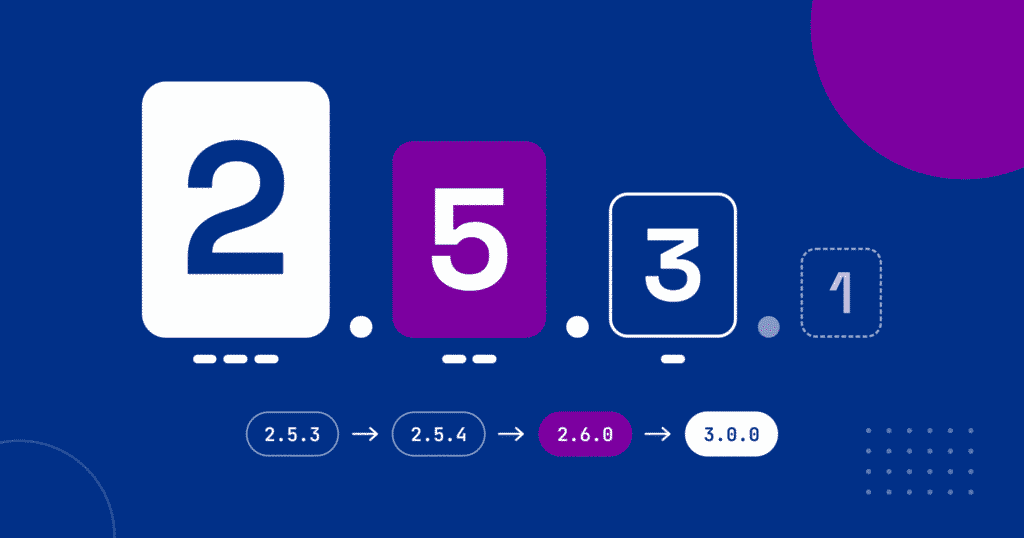
When you see an update for WordPress or a plugin, it will include a number like “Version 2.5.3”. But what do those numbers mean? It’s not random (mostly).
Version numbers are how developers track progress, fixes, and improvements. And each version normally includes a list of patch notes, explaining the changes it made compared to the previous version.
Why Version Numbers Matter
Every digital tool evolves. Developers release new versions to fix bugs, patch security holes, or add features.
Version numbers are the shorthand that tells you what kind of change you’re getting — whether it’s a light tune-up or a full engine replacement.
The Three-Part Format (1.0.0) — And Beyond
Much modern software follows a convention called semantic versioning, which uses three numbers separated by dots — for example, 2.5.3. Each part of that sequence has its own meaning.
The first number, known as the major version (the “2” in 2.5.3), changes when there are big, potentially breaking updates—major redesigns, deep structural changes, or new features that might not be compatible with older versions. When the major version changes, it’s worth taking extra care, since larger updates sometimes affect custom themes or plugins.
The second number, the minor version (the “5” in our example), increases when developers add new features or make improvements that don’t break existing functionality. These are the updates that might bring performance gains, new settings, or enhanced compatibility without disrupting your site.
Finally, the third number, the patch version (the “3”), is for the smallest of changes—bug fixes, security patches, and minor adjustments that make things run more smoothly. Sometimes a patch version even includes something as small as a spelling correction in the documentation.
In short: the farther left a number changes, the bigger the update—and the more cautious you should be about applying it immediately. A move from 2.5.3 to 2.5.4 is minor, but from 2.5.3 to 3.0.0 deserves a quick backup or test run before updating.
🟢 Sometimes There’s a Fourth Number
Some developers (like Rank Math) use a four-part version, such as 1.0.212.1.
That last digit usually refers to a build or revision — the tiniest type of change. RankMath seems to use them, for example, when they have to fix a misspelling; some other plugins use the third part for that.
Not all developers follow this format, but it’s common in larger or rapidly updated projects where releases happen frequently.
📜 Patch Notes — The (Supposed) Truth Behind Each Update
Each new version ideally comes with patch notes (or a changelog) listing what changed. For example:
- Fixed: Contact form not sending confirmation emails
- Improved: Performance when saving products
- Updated: Compatibility with WordPress 6.6
You can see the changelog right in WordPress; when I’m doing updates, I always read these first so, if something goes wrong, I at least have a starting point to what the issue may have been.
Unfortunately, not every developer documents changes equally well. Some leave out small fixes, while others quietly adjust code without listing it. Occasionally, patch notes are vague (“Various improvements”) or incomplete. Undocumented changes are sometimes an oversight – and sometimes they’re intentional, if the developer doesn’t want to draw attention to what was broken in the last version.
Update Size = Update Caution
As a general rule:
- Patch updates (like 2.5.3 → 2.5.4) are usually safe to install right away (a backup is still a good idea, though!)
- Minor updates (like 2.5 → 2.6) may need a quick test on a staging site or backup first.
- Major updates (like 2.x → 3.x) are where you really want to be careful — test before applying, especially if your site uses custom code or specialized plugins.
Bigger version jumps usually mean more things changed behind the scenes. That doesn’t mean you should avoid them. Just be sure your site has a recent backup and test first if you can!
Not Everyone Plays by the Rules
There’s no global authority enforcing version numbering. Developers often follow their own rhythm.
- Some jump ahead for marketing (going from 2.9 straight to 5 – remember how we went from Windows 8.1 straight to Windows 10?).
- Others skip patch releases or never publish changelogs.
- A few use dates instead of numbers (for example, a plugin called “Stop Spammers” uses the year and month, e.g. 2026.3).
There’s no “versioning police” to make sure the right numbers are being used; sometimes, it’s just a matter of getting used to what each piece of software uses.
WordPress itself doesn’t follow the rules of “semantic versioning” – going from 6.7 to 6.8 is a major update for WordPress core. And 6.9 to 7.0 is just because it’s the next number, not a particularly more extensive change.
What Version Numbers Mean for You
For you as a site owner, version numbers are helpful to make sure you’re staying up-to-date. They tell you how much something changed — and help you decide whether to update immediately or wait for a maintenance patch.
For example, if I maintain your site, I try to keep everything up to date. However, there are times when I hold off on an update because it may seriously alter how your site works. Sometimes, that even happens and I then have to restore an older version of the site, while we wait for the developer to overcome the flawed version.
So be sure to know what your updates do and be prepared, especially if they’re major updates! If I don’t already manage your updates, I’d be glad to customize a package for your site.